

Version-control your designs
Use Git checkpoints, branches, and source review to track and share your design changes.
Git records named checkpoints of files, called commits. Because Fanta stores designs as FNX and JSON, those checkpoints can describe a changed headline, a wider button, or a different layout value. You can compare versions, try an idea on a branch, and share a proposed change for review.
Fanta writes canvas edits to the design project after a short autosave delay. Autosave updates your files; a commit records a checkpoint in Git. In non-Store builds, Fanta initializes the folder as a Git repository when a bundled or system Git is available, unless the folder is already inside another repository. A .fig import attempts to create a source-backed project beside the original file; commit the project, not the import alone.
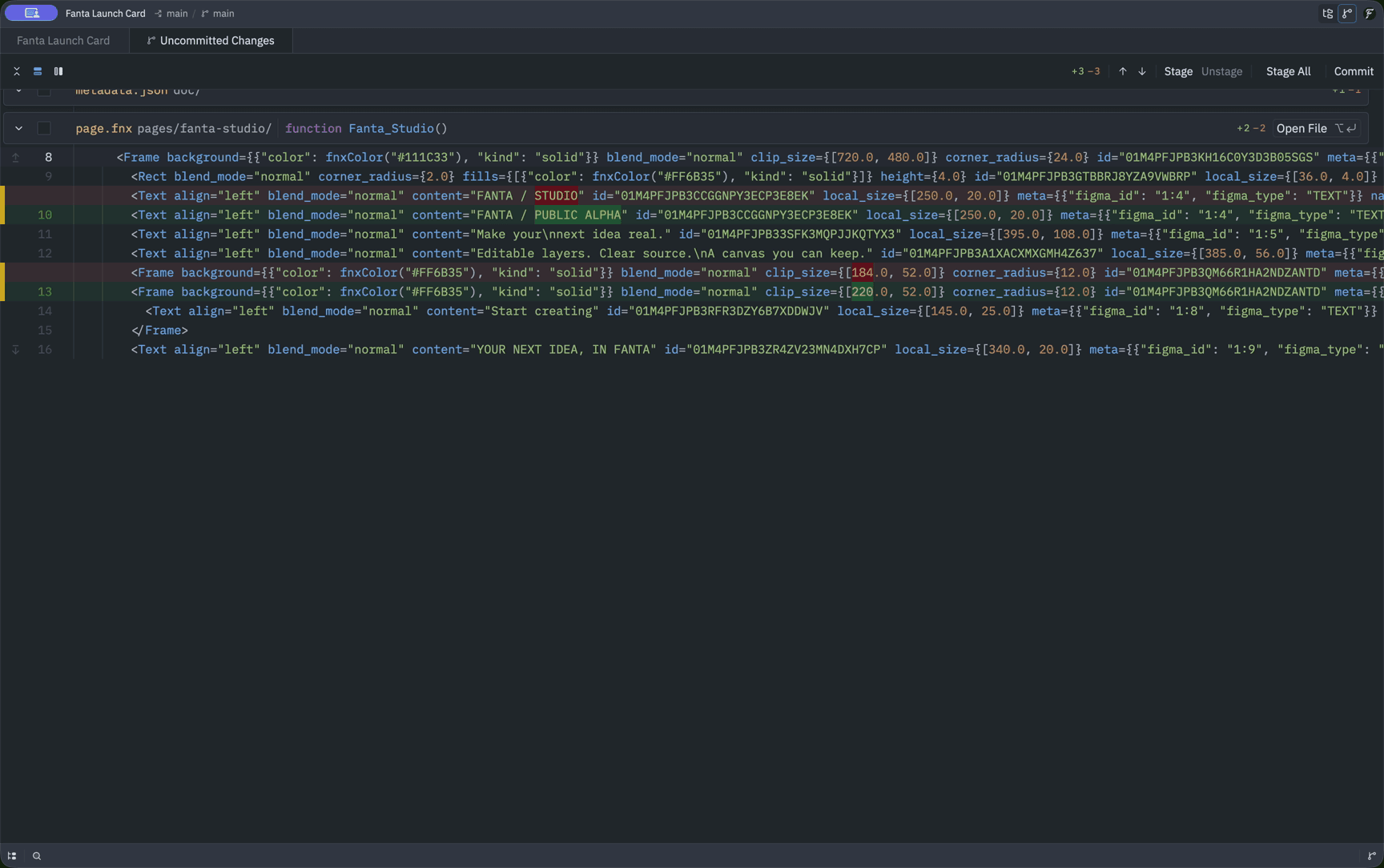
The launch-card demo changes “FANTA / STUDIO” to “FANTA / PUBLIC ALPHA” and a button frame's width from 184 to 220. Both edits appear in the FNX diff.
Review and commit an edit
- Make a canvas or
.fnxedit. Let canvas autosave finish, or save and validate the source draft. - Inspect the changed frame or page on the canvas. Capture a screenshot when you need a visual record for review.
- In a non-Store build, choose File → Review Changes or run
git diffin the project. Confirm the source diff matches the intended visual result. - Stage the intended files and commit through File → Commit… or your Git client. Use a message that explains the design change, such as “Widen the launch-card button.” Include any new assets the design uses.
Keep the project manifest, page and component FNX, identity sidecars, shared JSON, and referenced assets together. A lone page.fnx may depend on components, variables, or images elsewhere in the project. Check for new, untracked files as well as modified files. A text diff cannot show all changes inside binary media, so review those assets visually too.
Try an idea on a branch
A branch gives an experiment its own sequence of commits. Create a branch in Fanta's Git surfaces or your usual Git client before changing the design. For example, from a clean project repository:
git switch -c design/launch-cardMake the edit, compare the canvas and source, and commit it on that branch. If your repository has a remote, push the branch with your Git client and open a review in your repository host. Include screenshots and explain the intended result alongside the file diff. Git history stays local until you push or otherwise share the repository; a local commit does not publish the design.
Save or discard pending canvas and source drafts before switching branches. Fanta watches the project files and reconciles external changes, including a branch switch. If the branch changes the project's manifest ID, open it as a different project. Resolve any reported file conflicts before continuing to edit.
Merge with visual review
Git can merge text edits in different places, but a clean text merge does not establish that the combined design is correct. Two changes can interact through layout, variable bindings, components, or asset references even when Git reports no conflict.
When a merge has conflicts, resolve the FNX and its related project data together. Keep a node's existing ID with that node, and preserve IDs used by references. Never leave Git conflict markers in source you expect Fanta to parse. Validate the resolved project, reopen or reload it, and inspect the affected pages and components before accepting the merge.
This workflow supports asynchronous design review using your team's repository tools. It does not establish live multiplayer editing or automatically resolve competing visual changes.
Source preservation and build differences
Structural canvas edits retain authored FNX attributes and child comments on surviving nodes. Check the diff after moving or adding layers, especially in source you have customized by hand. A delete or type change that would remove source-only information may be refused; remove that information deliberately in FNX first if that is your intent. A refused save protects the files on disk, while the visible canvas edit may need Undo before you continue.
The external MCP server edits the design but does not commit it. The old vcs_* tool names are absent. If no .git was created in a non-Store build, check the bundled or system Git and initialize the repository with a Git client. Mac App Store feature builds intentionally skip automatic git init.
A Mac App Store feature build also omits bundled Git and blocks local command execution inside Fanta. Use a separate Git client for version history in that build. These restrictions describe the build configuration, not a claim that a public Store release is available. See Install and build for distribution details.