

Variables
Define reusable values, modes, aliases, and property bindings.
Variables
Variables let one value drive multiple properties. Fanta's Variables workspace lets you create collections, variables, and modes, edit values, create aliases, and bind values to design properties. The active mode can be selected for a scope so the same design can resolve different values.
The variable editor handles color, number, string, and boolean values. The agent operation schema also accepts typed typography variables. Imported documents may contain additional variable data; inspect the current design system before changing it.
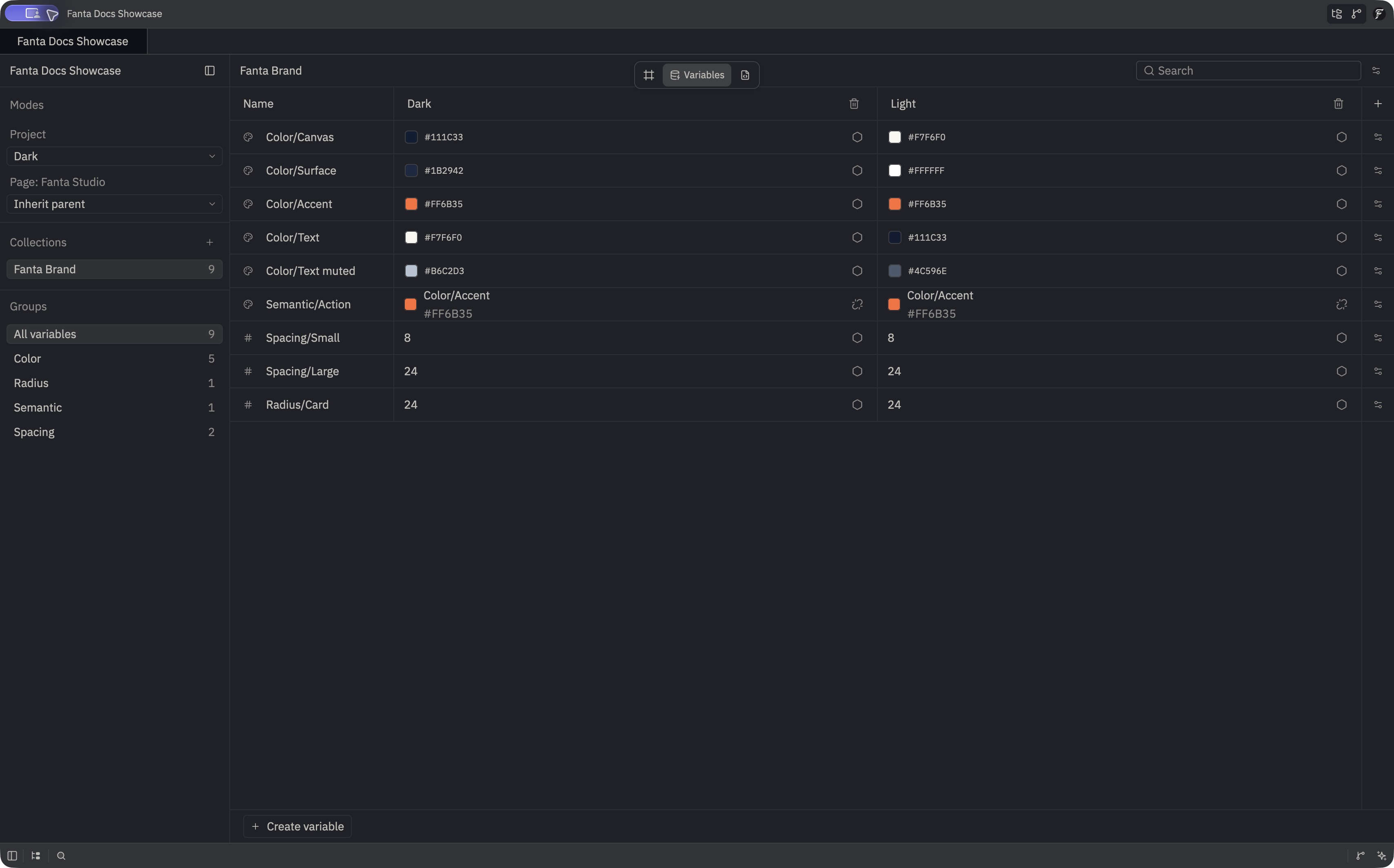
Create a collection and bind a value
- Open the Variables workspace.
- Create a collection and a variable in it.
- Set a value for each relevant mode.
- Return to the canvas, select a layer, and bind a compatible property in the inspector.
- Switch modes and inspect the resulting design.
In our sample, Collections selects the illustrative Fanta Brand launch-card collection, while Groups filters its Color, Radius, Semantic, and Spacing entries. Use Create variable at the bottom of the workspace to add another value. Under Modes, Project selects Dark and Page: Fanta Studio uses Inherit parent, so the page follows the project's mode.
Aliases point one variable at another. Check alias and mode resolution when a bound property appears to use a surprising value. Variable workspace controls are in crates/fig_viewer/src/variables_workspace.rs; value types are in crates/fanta-doc/src/value.rs.
For a color paint bound to a variable, the inspector shows its resolved color in the active mode and the variable name. The paint's opacity and visibility are read-only while the color binding is in place. Use Detach on the color variable to keep the resolved color as an ordinary paint, then edit the paint independently.
The Design inspector also resolves single-layer opacity, visibility, and uniform vector radius bindings through aliases and inherited mode pins. If an explicit four-corner radius is present, it takes precedence over the uniform radius binding. An unresolved binding shows the layer's fallback value with a label and can still be detached. A direct text-content binding on component text prevents local text edits in both the canvas and the instance Content row; edit the variable or remove the binding to change that text.
Work through an agent
Call get_design_system (or in-app design_system) first to read collection IDs, modes, typed values, and selected-node bindings. The external batch_design operations can create collections and variables, add a mode, set values or aliases per mode, set an active mode for the document or a frame, and bind or unbind compatible properties. Binding targets include fill or stroke color, stroke width, corner radius, opacity, visibility, text content or style, and clip size. Use exact IDs from the response for follow-up edits; names work only when unique.
The managed variable sources are doc/variables.json and doc/active_modes.json. If you edit one directly, validate the complete candidate with validate_fnx_source before saving and inspect the canvas after reload. See style and variables for an MCP example.