

FNX design as source
Understand FNX, the readable design source behind Fanta's canvas, and edit either view of your project.
FNX design as source
FNX is the text format Fanta uses to describe your design. A frame becomes a Frame element, a text layer becomes a Text element, and properties such as position, color, and layout become attributes. Nesting elements describes the layer hierarchy. You can read those files, edit them, and review their changes in Git.
The canvas and the source are two views of the same project. Draw or adjust a layer, and Fanta saves the change to FNX. Save a valid source edit, and Fanta updates the canvas. An agent can work on that same design through supported canvas operations or source edits.
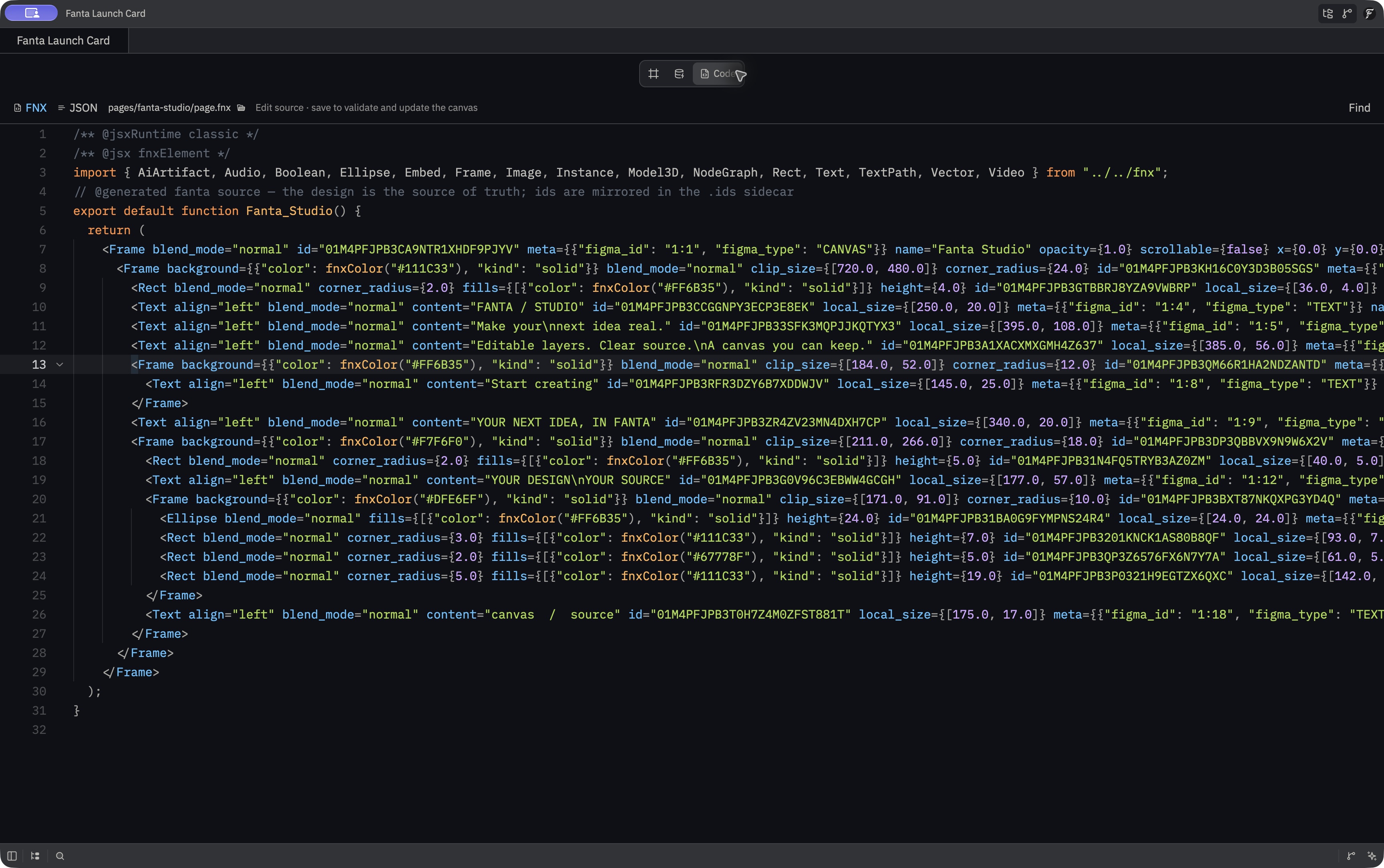
Design source and application code
FNX uses a familiar JSX-like shape, but it is a static design description. Its values describe nodes and their properties; Fanta parses them instead of executing arbitrary JavaScript. It does not provide React state, event handlers, or a running application. The function wrapper in generated source is a readable container for the design tree.
This makes the design accessible to source tools without pretending the artwork is already a finished app. Use FNX to author and inspect the design, then implement application behavior in your chosen framework. See Design to code for that workflow.
What a project stores
Fanta stores page layer trees in pages/<page>/page.fnx. A standalone component master is components/<component>/master.fnx. With layout version 5, a variant set lives under components/<set>/ with set.json and one <variant>/master.fnx per member. FNX is a readable, static JSX-like representation of nodes and properties. It prints explicit node IDs. Companion page.ids.json and master.ids.json sidecars carry supporting identity and sibling order information.
Other project data is managed JSON: page and component headers, variant sets, variables and modes, motion, prototypes, metadata, asset indexes, and more. The project also seeds fanta.md for design intent and AGENTS.md for agent guidance. Page and component artwork remains in FNX; JSON holds shared data and metadata.
A source file may express placement through parent-relative transforms, including X and Y translation, and width and height shorthand. It has conveniences for Rect and Ellipse shapes and colors through fnxColor. A TextPath element stores its own path geometry and text. A frame can express horizontal, vertical, or grid auto layout with fixed, fractional, or content-sized tracks. The canvas presents the resolved result.
When Fanta prints FNX, finite numbers keep their exact numeric value across a source round trip. Tiny floating-point values are not rounded to zero; those with many leading zeros may use exponent notation. This protects fine geometry and source-only data, though it can also make small arithmetic residue visible in Git diffs.
Edit source in Fanta
- Open the Code workspace. Select FNX for the active page or component master, or JSON for that source's
page.jsonordef.jsoncompanion. A variant opens its own source under the set folder. - Make a small, complete change. Once either buffer is dirty, canvas edits are locked to avoid competing changes.
- Save. Fanta validates the edited source against the complete project before writing, then reloads the canvas. It checks JSON types and references, so valid JSON syntax alone is insufficient.
- If validation fails, read the error, repair the source, and save again. An invalid edit leaves the last valid canvas and saved file intact.
The Code workspace has Find for the active FNX or JSON editor. Discard draft discards unsaved changes in only the selected buffer; another dirty source buffer keeps the canvas edit lock until it is saved or discarded too. A source Save handles the selected dirty buffer first, then the other if necessary. Successful Save retains the authored text edit in Undo history and saves geometry recomputed from that source change with it.
The workspace protects against a file changing on disk during a save. It blocks source saving while canvas changes or file conflicts still need resolution. Invalid source leaves the last valid file and canvas intact, so repair the draft or discard it. Unknown FNX attributes may produce nonfatal diagnostics; inspect warnings and the rendered result.
After either kind of edit, review both the rendered design and its source diff. A screenshot shows the visual result; the diff shows which properties, text, or references changed. Version-control your designs explains checkpoints, branches, and review.
Canvas edits and authored source
The editor patches the affected FNX when a canvas property changes. For a structural canvas edit, it rebuilds the changed tree while retaining authored attributes on surviving nodes, such as a page root's source-only dimensions or a future field, and keeps JSX child comments with their nodes on reparent. Explicitly removing a field in source is respected on later saves.
If deleting a node or changing its kind would lose source-only attributes or child comments that canvas Undo cannot reconstruct, Fanta reports a preservation error instead of silently rewriting the file. Edit FNX directly to remove that content intentionally, then retry the canvas change. Persisted files remain protected after a refused save; use canvas Undo if the attempted operation is still visible.
Edit with an external editor or agent
External file edits are reconciled into the open project. Before writing an FNX or managed JSON candidate, an external agent can call validate_fnx_source with the complete candidate and project path. The tool validates without writing. For an existing managed file, it checks the candidate in the context of the full project; a new managed file receives a typed or syntax check until its companion source exists. Then save with normal file tools and inspect the canvas.
Keep existing IDs and references. Modern FNX with explicit IDs can recover a missing or damaged identity sidecar; Fanta reconstructs identity and order from the source and repairs the sidecar on a successful save. Older FNX without explicit IDs still needs its sidecar. Commit source, sidecars, headers, and assets together.
Do not rename a component by editing only its def.json name. An FNX instance may reference that name, and the project can fail to load if its references are left behind. Use the canvas or rename_component; use the variant operations to maintain set.json and member folders. The Code workspace edits only the selected page or component FNX and companion header, while external file tools can reach other managed files.
The implementation lives in crates/fanta-fnx/src/, crates/fanta-format/src/project/, and crates/fig_viewer/src/code_workspace.rs. See FNX source and Fanta project layout.